
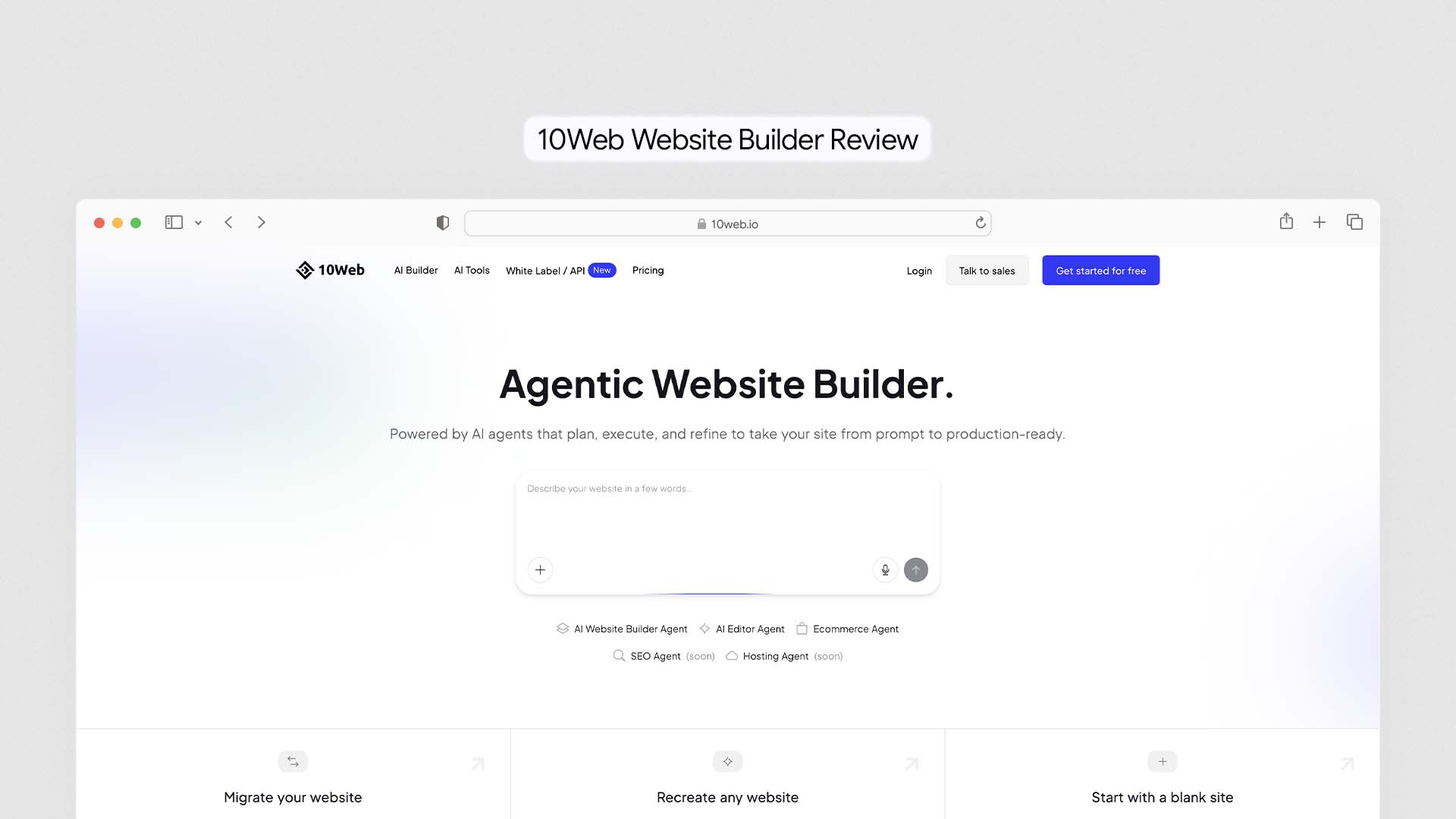
10Web is an AI-powered WordPress platform that bundles website generation, managed hosting on Google Cloud, automated speed optimisation, and WooCommerce ecommerce into one dashboard — starting at $10 per month. It is not a standalone website builder like Wix or Squarespace. It is an AI-powered layer on top of the world's most flexible CMS, designed specifically for people who want the power of WordPress without the complexity of managing servers, plugins, backups, and performance separately. Over 2 million AI-generated sites have been created on 10Web, and its search growth surged over 850% in the past year.
This is an honest, warts-and-all review. We cover exactly what 10Web does, what its real limitations are, what it costs at each plan level, how it compares to Wix, Elementor, and Durable, and the specific types of users it is genuinely worth it for — and the ones it is not.
If you want to compare 10Web with other AI-powered platforms, see our full guide to the Best AI Website Builders.
What Is 10Web?
10Web launched as a WordPress hosting and plugin company and evolved into one of the first platforms to combine AI website generation with managed WordPress hosting in a single product. The result is something that no other builder on the market quite replicates: a system where you describe your business, the AI builds a complete WordPress site, and Google Cloud hosting is configured and live — all without installing anything, managing a server, or opening a terminal.
Many businesses evaluating 10Web are deciding between WordPress and all-in-one builders. Our guide to the Best Website Builder and Hosting for Small Business compares both approaches.
The key distinction from standard hosted builders is that 10Web produces a real WordPress site. Not a proprietary-format site that looks like WordPress. An actual WordPress installation — with access to 60,000+ plugins, WooCommerce, the full Elementor editor, staging environments, SSH and SFTP access, and every other capability that makes WordPress the most widely used CMS in the world. You are not locked into 10Web's platform the way you are with Wix or Squarespace. If you ever want to migrate to another host, your site goes with you exactly as it is.
How 10Web Works — Step by Step
Step 1: Describe Your Business or Clone a URL
10Web gives you two ways to start. The first is a text prompt: you describe your business type, your industry, your target audience, and what pages you need. The AI generates a complete WordPress site — layout, content sections, images, and page structure — based on that description in under three minutes.
The second method is the Website Cloning feature, which is genuinely unique in the builder market. You paste any website's URL into 10Web, and the AI recreates that site's layout and structural approach as a customisable WordPress template. This does not copy text or images — it analyses the layout, section hierarchy, and design approach, then builds a WordPress version you can adapt. For businesses that know exactly what kind of site they want, this is a significant time-saver.
Step 2: Customise With the AI-Powered Elementor Editor
Once the AI generates your site, you edit it in a modified version of the Elementor page builder. 10Web's editor adds AI capabilities on top of standard Elementor: you can generate new content sections by typing a description, rewrite page copy with the built-in AI writing tool, generate images, and make structural changes using the AI Co-Pilot chat interface.
If you have used Elementor before, 10Web's editor is immediately familiar. If you have not, the learning curve is steeper than Wix or Squarespace — Elementor is powerful but it assumes some understanding of how WordPress page building works.
Step 3: Hosting Is Configured Automatically
This is where 10Web's integrated approach pays off most clearly. The moment your site is generated, it is already hosted on 10Web's Google Cloud infrastructure. SSL is enabled, automated backups are running, the CDN is configured, and the PageSpeed Booster — 10Web's proprietary performance optimisation tool — is already working to ensure your site scores above 90 on Google's PageSpeed test.
If you are unfamiliar with modern hosting infrastructure, this guide explains what cloud hosting is and why platforms like 10Web use it for performance and reliability.
You do not need to configure caching, set up a CDN separately, install a backup plugin, or tune your server settings. Everything that typically takes hours of setup on a standard WordPress hosting account is done automatically before you make your first edit.
Step 4: Add Ecommerce, SEO Tools, and Plugins
WooCommerce is available on all plans — pre-configured and ready for products, inventory, payments via Stripe, and checkout. The AI SEO Assistant integrates directly with Yoast SEO inside the WordPress editor, letting you optimise posts and pages for target keywords, fix readability issues, and generate schema markup without leaving the editing interface. The full WordPress plugin directory is accessible from day one, meaning any functionality 10Web does not provide natively can be added through the ecosystem you already know.
What 10Web Does Well
The Speed Optimisation Is Genuinely Impressive
10Web's PageSpeed Booster is the feature that most consistently surprises users who have spent time fighting with WordPress performance issues. It applies a comprehensive set of optimisations automatically — image compression, CSS and JavaScript minification, lazy loading, critical CSS generation, and Google Cloud CDN delivery — and the results are measurable. Sites hosted on 10Web routinely score 90–98 on Google PageSpeed Insights without any manual configuration.
For context: a standard WordPress site on a shared hosting plan typically scores 45–65. Getting that score above 90 manually requires installing multiple plugins (caching, image optimisation, CDN), configuring each one correctly, and regularly testing for regressions. 10Web removes all of that work and delivers the result automatically. Given that page speed directly affects both user experience and Google rankings, this is one of 10Web's most tangible competitive advantages.
Website Cloning Saves Hours on Every New Project
The cloning feature — paste a URL, get a WordPress site built in that style — is used by two types of users: freelancers and agencies building multiple client sites, and business owners who have found a competitor's site they want to use as a structural reference for their own.
For agencies in particular, the ability to generate a structurally complete WordPress site in three minutes rather than building from a blank Elementor canvas saves significant billable hours per project. Multiple agencies using 10Web report building first-draft client sites in under 30 minutes from initial brief to a customisable starting point.
Full WordPress Ecosystem — No Lock-In
Every site generated by 10Web is a standard WordPress installation. You can install any of the 60,000+ plugins in the WordPress repository. You can use custom themes. You can give your developer SSH or SFTP access to work at the code level. You can migrate the entire site to another host at any time without losing anything.
This is the fundamental advantage over Wix, Squarespace, and Durable — none of which allow real code access or clean migration. With 10Web, the AI handles the setup complexity while WordPress handles the long-term flexibility. That combination is genuinely difficult to replicate.
AI Content Generation Saves Time on Copy
The integrated AI writing tool — which works directly inside the Elementor editor and the WordPress post editor — generates page sections, rewrites existing copy, creates product descriptions, and writes SEO-optimised blog posts. Word limits depend on your plan: 5,000 words per month on the AI Starter plan, 50,000 on AI Premium, and unlimited on AI Ultimate.
For businesses that publish content regularly, the AI writing integration removes the context-switching of writing in a separate tool and pasting into WordPress. For businesses building their initial site, having AI-generated starting copy that you refine is meaningfully faster than writing every section from scratch.
Google Cloud Infrastructure Delivers Reliable Performance
10Web hosts all sites on Google Cloud Platform with isolated containers for each website — meaning one site's traffic spike does not affect another site's performance. The hosting includes automated daily backups, staging environments where you can test changes before pushing them live, PHP version control, and a 99.9% uptime guarantee.
For freelancers and agencies managing multiple client sites, the multi-site dashboard lets you monitor, update, and manage all WordPress installations from a single control panel — without logging into each site separately. This alone justifies the platform for studios managing five or more active client sites.
Where 10Web Falls Short
The AI-Generated Content Needs Substantial Editing
This is the most consistently reported limitation across real user reviews, and it is important to set accurate expectations before you sign up. The AI generates functional placeholder content — sections that capture the general concept of a homepage, an about page, or a services page — but the copy is generic, the images are stock, and the tone rarely matches a specific brand voice out of the box.
Reviewers consistently describe the AI output as a solid first draft rather than a finished product. You will rewrite most of the text, replace the generated images with your own photos, and adjust layouts to fit your brand. The AI saves you the structural setup time — building the page skeleton, adding the right sections in the right order — but it does not save you the content creation work. Businesses that expect a complete, publish-ready site from a prompt will be disappointed.
Not Suitable for Complete WordPress Beginners
10Web's marketing emphasises ease of use, and the AI generation step genuinely is easy. But once you are inside the Elementor editor making customisations, you are working in WordPress — and that brings its learning curve with it. Concepts like posts versus pages, how Elementor sections and columns work, how plugins get installed and configured, and how to troubleshoot a white screen or plugin conflict require some WordPress familiarity.
Independent reviewers and Capterra user feedback consistently confirm: complete beginners with no WordPress experience find the platform frustrating in ways that Wix or Squarespace do not. If you have never used WordPress before and your priority is the simplest possible path to a live website, 10Web is not the right starting point. Wix, Durable, or Hostinger are better fits.
Traffic Limits Can Surprise You Mid-Month
Every 10Web plan has a monthly visitor limit — 10,000 visitors on the AI Starter plan, 50,000 on AI Premium, unlimited on AI Ultimate. When you approach your plan's limit, 10Web notifies you and requires an upgrade. If you do not upgrade, your site stops accepting new traffic until your billing period resets. There is no overage billing — your site simply becomes unavailable to new visitors.
For most small business sites, 10,000 monthly visitors is sufficient in the early stages. But for any site with seasonal traffic spikes, a product launch, or a piece of content that goes viral, this limit can become a problem unexpectedly. The Scribehow review of 10Web notes that overage is charged at $2 per additional 10,000 visitors on some plans — check your specific plan's terms before publishing content you expect to drive significant traffic.
Migration Can Be Temperamental
10Web offers one-click automated migration from any WordPress host, and for standard sites — typical plugins, standard database size, no custom server configurations — it works well. For more complex WordPress installations with unusual plugin setups, large databases, or custom code, users report needing to troubleshoot migration errors manually. Testing during the trial period before committing to a full migration is strongly recommended.
Email hosting is also notably absent. 10Web does not include professional email (you@yourdomain.com). You will need a separate email hosting solution — Google Workspace at $6 per user per month, Zoho Mail at $1 per user per month, or another provider. This is a real additional cost that is not always visible in the initial pricing comparison.
Customer Support Is Inconsistent at Scale
10Web has a 24/7 live chat support team, and many users describe fast and helpful responses. However, Trustpilot reviews reveal a pattern of inconsistency for more complex technical issues — particularly around DNS configuration, wildcard certificates, and multi-site setups. Some users report resolution times of over a week for issues that affected their production sites. For agencies managing client sites where uptime directly affects client relationships, this inconsistency is worth factoring into your platform decision.
10Web Pricing — Every Plan Explained
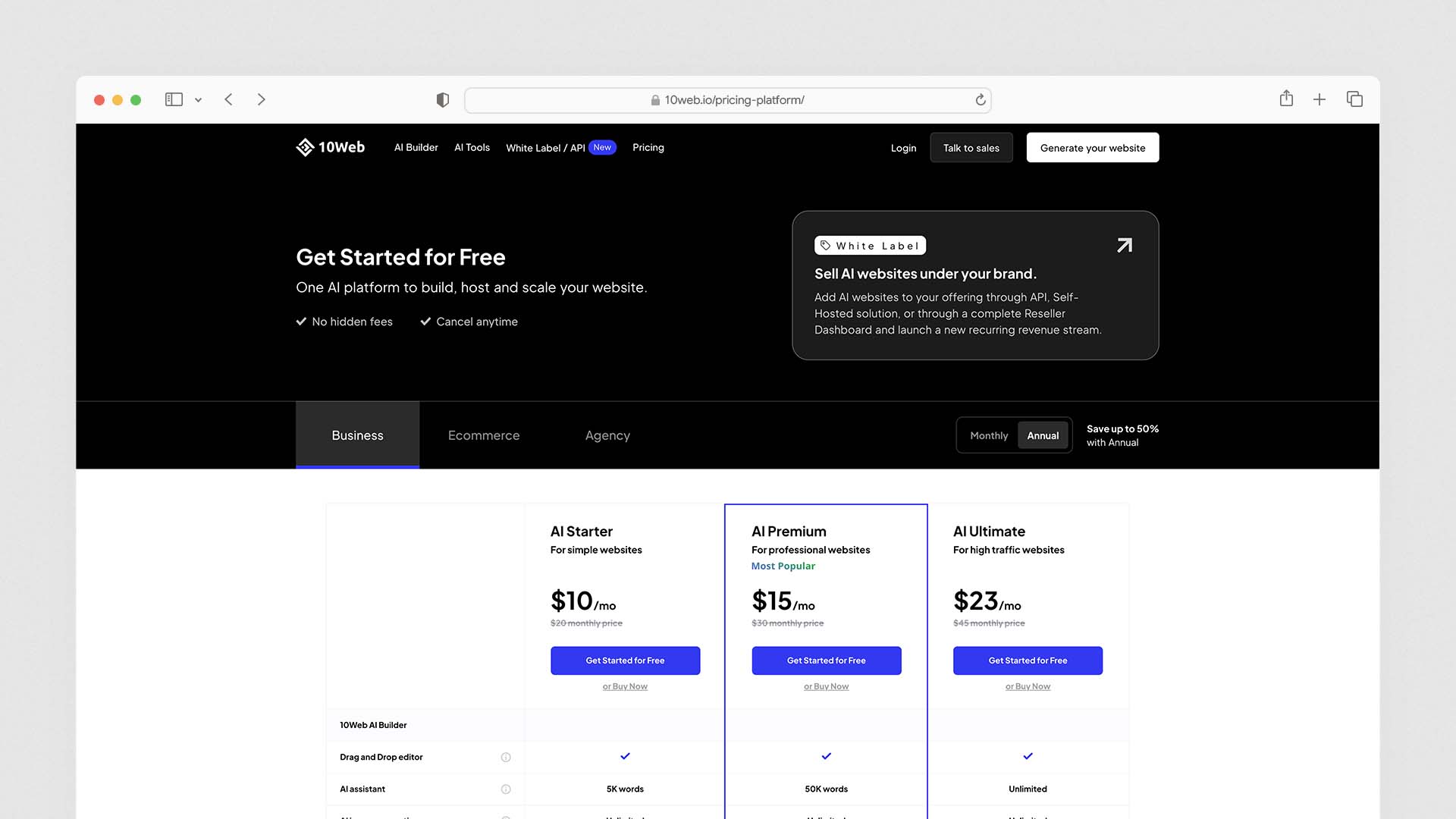
10Web offers a 7-day free trial with full feature access after the initial AI site generation at no cost. No credit card is required to generate the initial site, but the trial requires payment details to activate.
Individual Plans (Single Website)
Plan | Annual Price | Visitors/Month | AI Words/Month | Key Features |
|---|---|---|---|---|
AI Starter | $10/month | 10,000 | 5,000 | AI builder, Elementor, Google Cloud hosting, SSL, backups, CDN |
AI Premium | $15/month | 50,000 | 50,000 | Free custom domain, priority support, staging environment |
AI Ultimate | $25/month | Unlimited | Unlimited | Unlimited visitors, unlimited AI words, highest performance tier |
Agency Plans (Multiple Websites)
Plan | Annual Price | Websites | Key Features |
|---|---|---|---|
Agency | $38/month | 10 websites | White-label dashboard, multi-site management, team management, VIP support |
Agency+ | $69/month | 25+ websites | Custom site limits, highest support priority, full white-label branding |
What Does Each Plan Actually Cost in Practice?
For a solo freelancer or small business with one website: AI Premium at $15/month is the realistic minimum. AI Starter's 10,000 monthly visitor limit is too restrictive for any site that receives consistent organic search traffic, and AI Starter does not include a free custom domain.
For a freelancer or small agency managing between 3 and 10 client sites: Agency at $38/month is the value play. At that price you get white-label branding (so clients see your agency's name, not 10Web's), a multi-site management dashboard, and VIP support — which saves enough time per client site to justify the monthly fee many times over.
For high-traffic sites or sites that publish regular content: AI Ultimate at $25/month removes the visitor cap anxiety and the AI word limit, which becomes significant for content-heavy sites that use the AI writing tool regularly.
The Hidden Cost: Email Hosting
Every competitor analysis of 10Web pricing should include professional email. Since 10Web does not provide it, add $6/month per user for Google Workspace or $1/month for Zoho Mail to any cost calculation. For a solo business owner, the real monthly cost of 10Web AI Premium is $15 + $6 = $21/month — comparable to Wix Core and Squarespace Core when you factor it in.
10Web vs The Alternatives
10Web vs Wix
Wix is a hosted proprietary platform — it generates and hosts your site in Wix's own format with no code access, no plugin ecosystem, and no migration path. It is easier for absolute beginners and includes a broader set of built-in business tools (email marketing, CRM, bookings) without needing to find and install plugins.
Wix also ranks as the best overall platform in our comparison of the Best AI Website Builders.
10Web gives you real WordPress — every plugin, WooCommerce, full code access, staging environments, and the ability to migrate to any host. It requires more technical familiarity but offers significantly more long-term flexibility.
Feature | 10Web | Wix |
|---|---|---|
Platform | WordPress (standard) | Proprietary |
Code access | ✅ Full SSH/SFTP | ❌ None |
Plugin ecosystem | ✅ 60,000+ WordPress plugins | Limited App Market |
Migration freedom | ✅ Export and move anywhere | ❌ Cannot export site |
Ecommerce | WooCommerce (full-featured) | Wix ecommerce (Core plan+) |
Email marketing | Via plugins (Mailchimp etc.) | ✅ Built-in |
Starting price | $10/month | $17/month |
Best for | WordPress users, agencies | Beginners, small business |
10Web vs Elementor (standalone)
Elementor is a WordPress page builder plugin — it is what 10Web's editor is built on. Using Elementor standalone means installing it on your own hosting, managing WordPress separately, and handling your own performance optimisation and backups. 10Web bundles Elementor with managed hosting, AI generation, automated speed tools, and a multi-site dashboard.
For users who already have WordPress hosting they are happy with, Elementor Pro at $59/year may be the better choice. For users who want the full AI generation and managed infrastructure without the separate hosting setup, 10Web's integrated approach delivers more value per month.
10Web vs Durable
Durable is the opposite end of the spectrum from 10Web. Where 10Web gives you WordPress with all its complexity and flexibility, Durable generates a simple business website in under 60 seconds with almost no customisation options. Durable includes a CRM, invoicing, and AI marketing tools. 10Web includes WordPress, WooCommerce, and a full development environment.
Feature | 10Web | Durable |
|---|---|---|
Platform | WordPress | Proprietary |
Setup time | 3–10 minutes | Under 60 seconds |
Design flexibility | High (Elementor) | Low (limited customisation) |
Ecommerce | ✅ WooCommerce | ❌ Limited |
CRM and invoicing | Via plugins | ✅ Built-in |
Code ownership | ✅ Full WordPress export | ❌ None |
Starting price | $10/month | $12/month |
Best for | WordPress users, complex sites | Local services, simple sites |
10Web vs Hostinger
Both 10Web and Hostinger offer AI website builders with managed hosting. The key difference is the underlying platform: Hostinger's AI builder creates a site on Hostinger's proprietary platform. 10Web's AI builder creates a real WordPress site.
Hostinger is faster to launch, cheaper at $2.99/month, and requires no WordPress knowledge. 10Web gives you WordPress with full plugin access, WooCommerce, staging environments, and significantly better SEO tooling via Yoast integration. For businesses that need a simple site with fast load times, Hostinger wins. For businesses that need the flexibility of WordPress, 10Web wins.
If you want a simpler platform that you can build yourself without WordPress, our guide to the Best DIY Website Builders explains which tools are easiest for beginners.
Who Should Use 10Web
Freelancers and agencies building WordPress sites for clients. The combination of AI generation speed, website cloning, white-label branding, and multi-site management makes 10Web a genuine productivity multiplier for web professionals. Building a first-draft client site in under 30 minutes rather than several hours is a meaningful business efficiency gain.
Small businesses already invested in the WordPress ecosystem. If you have existing WordPress experience, use WooCommerce for your store, and rely on specific WordPress plugins for your workflow, 10Web gives you AI-powered setup and managed infrastructure without abandoning any of that.
Businesses serious about PageSpeed and Core Web Vitals. If Google search performance is a priority and you do not want to spend hours on WordPress performance configuration, 10Web's automated optimisation tools deliver 90+ PageSpeed scores without any manual work.
Content-heavy websites and blogs. WordPress's content management capabilities — scheduling, categories, tags, custom post types, the Gutenberg block editor, the full plugin ecosystem for SEO — remain unmatched. 10Web's AI content tools accelerate that content creation workflow without replacing it.
Who Should Not Use 10Web
Complete beginners with no WordPress experience. The AI generation step is easy, but the customisation work that follows requires WordPress familiarity. If you have never used WordPress and need a simple business website live today, Wix, Durable, or Hostinger are better starting points.
Businesses that need the simplest possible solution. 10Web's value comes from its depth — which also means its complexity. If you need a five-page site with a contact form and you do not want to learn Elementor, there are faster and simpler paths to that result.
High-traffic sites on lower budget plans. The visitor limits on the AI Starter plan are a real constraint for any site that expects consistent organic traffic growth. If you are on a tight budget and your site is growing, you will hit the limit and face an unplanned upgrade cost.
Users who need email hosting included. If your budget comparison assumes email is bundled (as it often is with GoDaddy or Network Solutions), remember that 10Web does not include it. Factor the additional email hosting cost into any real comparison.
Real 10Web User Experiences — What the Reviews Actually Say
Drawing from verified reviews on Capterra, G2, and Trustpilot with over 2,000 combined responses:
What users consistently praise: The PageSpeed optimisation works as advertised and delivers measurable results. The AI builder generates a usable structure faster than any manual WordPress setup. The support team is responsive for standard issues. The pricing is considered fair for the hosting quality provided.
What users consistently criticise: The AI-generated content requires significant editing before it feels brand-specific. The Elementor editor has a learning curve for WordPress newcomers. Migration tools work well for simple sites but need manual intervention for complex setups. Email hosting is absent. Support response times for complex technical issues can extend to several days.
The AppSumo lifetime deal controversy: A notable pattern in Capterra reviews involves users who purchased 10Web via AppSumo lifetime deals and found that major new features — including the AI builder itself — were excluded from their lifetime access. While this does not affect users purchasing directly from 10Web, it is worth knowing when researching the platform's reputation.
Tips for Getting the Best Results From 10Web
Be Specific in Your Initial Prompt
The more precisely you describe your business in the initial generation prompt, the less editing you will need to do afterward. Instead of "photography business website," write "wedding and portrait photography business in Mumbai, targeting premium clients, needs portfolio gallery, packages and pricing page, client testimonials, and a contact form for booking enquiries." The difference in output quality between a vague prompt and a specific one is significant.
Use Website Cloning for Competitor Research
If you have a competitor's site you admire — not to copy, but to use as a structural reference — 10Web's cloning feature is the most efficient way to start. Generate the WordPress structure from their URL, then replace every piece of content with your own. You get the benefit of their layout decisions without any content duplication.
Test Migrations During the Trial Period
If you are migrating an existing WordPress site to 10Web, do it during the 7-day trial. Run the migration tool, check that everything has transferred correctly, verify your plugins and configurations work, and test the PageSpeed score before committing to a paid plan. This eliminates the risk of discovering migration issues after you have cancelled your previous host.
Use the Staging Environment Before Making Major Changes
Every plan above AI Starter includes a staging environment — a clone of your live site where you can test plugin updates, theme changes, and new page designs without affecting what visitors see. Using staging before pushing major changes live is a professional habit that prevents the most common WordPress disasters.
Monitor Your Visitor Usage Monthly
10Web tracks your monthly visitor count in your dashboard. Check it monthly, especially in your first three months on the platform. If you are consistently using 80% or more of your plan's visitor limit, upgrade proactively rather than hitting the cap during a traffic spike.
Final Verdict
10Web occupies a specific and valuable position in the AI website builder market. It is not the right tool for everyone — complete beginners will find it more complex than Wix or Durable, and businesses that need built-in email or CRM will need to add separate tools. But for the users it is built for, it delivers something genuinely difficult to replicate: AI-powered WordPress setup with Google Cloud hosting, automated performance optimisation to 90+ PageSpeed scores, and full code ownership — all from a single platform at a price that competes directly with standard managed WordPress hosting.
For a broader comparison of AI-powered platforms, see our guide to the Best AI Website Builders.
The headline summary:
Choose 10Web if you want WordPress with AI-powered setup, managed Google Cloud hosting, automated performance tools, and no server management — and you have at least basic WordPress familiarity
Choose Wix if you need the easiest possible setup with the widest range of built-in business tools, and you have no WordPress experience
Choose Elementor standalone if you already have WordPress hosting you like and just need a powerful page builder on top of it
Choose Durable if you need the fastest possible path to a simple live business website with zero technical involvement
Choose Hostinger if budget is your primary constraint and you do not need WordPress specifically
The AI generation step saves real time. The PageSpeed Booster delivers real results. The WordPress foundation means you never hit a ceiling. For WordPress users and web professionals, 10Web is one of the most practical AI-powered tools currently available.
FAQs
What is 10Web and how does it work?
10Web lets you generate your initial AI website at no cost, then gives you a 7-day free trial with full access to all features. After the trial, paid plans start at $10 per month (billed annually). A credit card is required to activate the trial even though the initial site generation has no charge.
Is 10Web free?
10Web lets you generate your initial AI website at no cost, then gives you a 7-day free trial with full access to all features. After the trial, paid plans start at $10 per month (billed annually). A credit card is required to activate the trial even though the initial site generation has no charge.
Is 10Web better than Elementor?
Elementor is a WordPress page builder plugin — one component of a WordPress site. 10Web bundles an Elementor-based editor with managed WordPress hosting, AI site generation, automated speed optimisation, and a multi-site dashboard. They are not direct competitors. If you want to use Elementor, 10Web is one of the best-managed hosting environments for it. If you already have WordPress hosting you are satisfied with, Elementor Pro standalone at $59/year may be sufficient.
Does 10Web use WordPress?
Yes. Every site built on 10Web is a standard WordPress installation. You have full access to the WordPress admin dashboard, the plugin directory, WooCommerce, custom themes, and developer-level access via SSH and SFTP. This is a core differentiator from proprietary hosted builders like Wix and Squarespace, which do not give you WordPress or any form of code access.
What hosting does 10Web use?
10Web hosts all websites on Google Cloud Platform with isolated containers for each site, CDN delivery, automated daily backups, staging environments, PHP version control, SFTP and SSH access, and a 99.9% uptime guarantee. The hosting infrastructure powers 10Web's PageSpeed Booster, which automatically optimises sites to score above 90 on Google PageSpeed Insights.
How fast are 10Web websites?
Sites hosted on 10Web consistently score 90–98 on Google PageSpeed Insights, compared to a typical score of 45–65 for standard WordPress sites on shared hosting. This performance is achieved through 10Web's automated PageSpeed Booster, which applies image compression, CDN delivery, CSS and JavaScript minification, lazy loading, and critical CSS generation automatically — without requiring any manual configuration or additional plugins.
Latest Blogs
Get the Latest Tech Insights in Your Inbox.
No spam, unsubscribe anytime.