
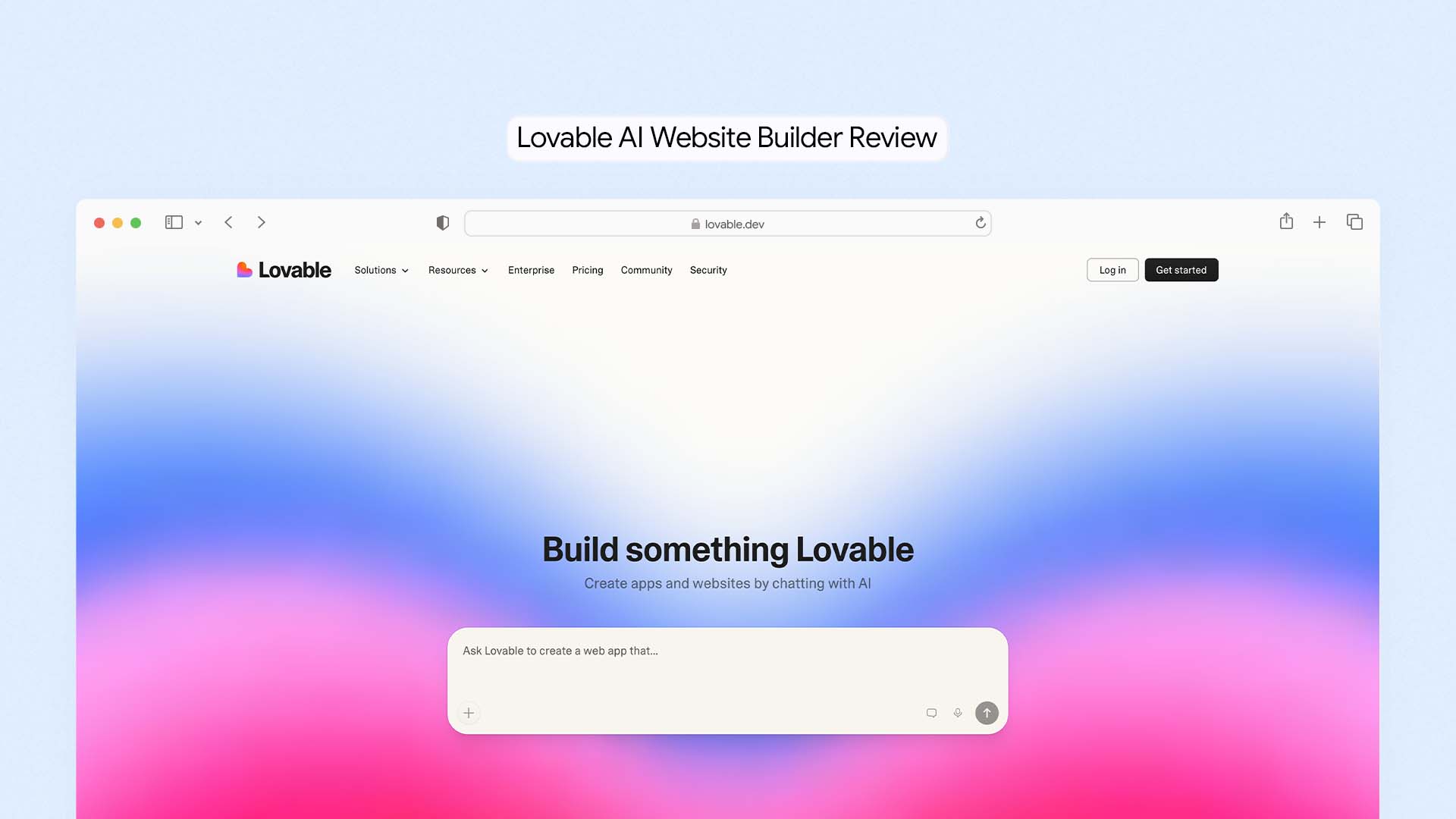
Lovable is an AI-powered web application builder that converts plain English descriptions into fully working React and TypeScript web apps — with a real database, real authentication, real payment processing, and real code you own and can export. It is the fastest-growing AI builder in history, growing from zero to $200M ARR in under 12 months, and it has fundamentally changed how founders, product managers, and non-technical builders create software. It is not a traditional website builder and it is not right for everyone — but for the specific job it is built for, nothing else comes close.
If you want to compare Lovable with other tools in the category, see our full comparison of the Best AI Website Builders.
This is a genuine hands-on review. We cover exactly what Lovable does, what it cannot do, what it actually costs at different usage levels, how it compares to Bolt.new, Base44, and Wix, and who should use it versus who should look elsewhere.
What Is Lovable?
Lovable started as GPT Engineer — one of the earliest experiments in letting AI write complete software from a description. It rebranded to Lovable in late 2024, refined its product around non-technical users building real products, and grew at a rate that no European software startup had achieved before it.
At its core, Lovable is a chat interface where you describe what you want to build, and the AI writes the entire codebase. You see every file it creates, you can watch it work in real time, and when it is done you get a live preview that works the way a real app works — not a mockup, not a template with swapped text, but a functioning application.
We explain this concept in detail in our guide to what vibe coding is and how it is changing software development.
What Lovable Actually Builds
Lovable builds full-stack web applications. In practice, this means it can produce:
SaaS dashboards with user login, role-based access, and subscription billing
Internal business tools — CRM systems, project management boards, inventory trackers
Client portals where customers can log in and access their own data
Booking and reservation systems with calendar integration
E-commerce stores with product management and checkout
Landing pages and marketing sites with CMS-driven content
MVPs and product prototypes for startup fundraising and investor demos
What Lovable does not build: mobile apps (iOS or Android), complex machine learning pipelines, or enterprise-grade systems with thousands of custom integration requirements.
How Lovable Works — Step by Step
Step 1: Write Your Prompt
You start with a description of what you want to build, written the way you would explain it to a developer. The more specific your description, the better the output. A vague prompt like "build me an app" wastes credits and produces something generic. A specific prompt like "build a SaaS invoicing tool where freelancers can create clients, log billable hours, generate PDF invoices, and accept payment via Stripe" gives the AI enough detail to produce something genuinely useful.
You can also upload a Figma design, a screenshot of an existing app you want to replicate, or a wireframe sketch — and Lovable will use that visual reference to guide the layout and component design.
Step 2: Review the Plan (Plan Mode)
Before it starts writing code, Lovable now shows you a structured plan of what it intends to build. You can read through each component it plans to create, raise any concerns, and give it additional direction before a single credit is spent on generation. This feature was added in early 2026 in response to the most common complaint from early users — that the AI would misunderstand the brief and burn through credits on work that needed to be completely rebuilt.
Plan Mode is genuinely valuable. In testing, reviewing the plan before generation reduced the number of back-and-forth correction cycles by roughly half.
Step 3: Watch It Build
Lovable generates the application in real time. You can see log messages showing exactly which files it is reading and writing — "Editing src/components/Dashboard.tsx," "Creating src/lib/stripe.ts" — which confirms it is building a real project structure, not stitching together template fragments. A live preview panel updates as each component is completed so you can see the app taking shape as it builds.
Step 4: Connect Your Backend Services
For apps that need a database, user authentication, or payment processing, Lovable connects to three core external services:
Supabase for the database and user authentication
Stripe for payment processing and subscription billing
Resend for transactional emails
You connect each service using API keys — a process that takes about five minutes per service with Lovable's guided setup. Once connected, the AI writes all the integration code automatically. You do not need to know how Supabase works or how to configure a Stripe webhook.
Step 5: Export Your Code and Deploy
Every project built in Lovable is synced automatically to a GitHub repository. You own that code. You can clone it locally, hand it to a developer to extend, deploy it to your own hosting, or continue working on it in any code editor. Lovable also offers one-click deployment to its own hosting with a custom domain — so you can go from generated app to live URL without leaving the platform.
What Lovable Does Well
Speed — Building in Hours What Used to Take Weeks
The most consistent finding across real-world Lovable testing is raw speed. A working MVP that would take a developer two to four weeks to scaffold — setting up authentication, database schema, API routes, UI components, deployment pipeline — can be produced in two to six hours of conversation with Lovable. For founders validating a product idea before committing to building it properly, that compression of time is transformative.
In testing for this review, a functional invoice management app — with client management, billable hours tracking, invoice generation, and a Stripe payment link — was built and deployed to a live URL in approximately three and a half hours of prompting and review. No code was written manually.
Full-Stack Capability — Not Just a Pretty Frontend
The key distinction between Lovable and tools like Framer or Webflow is that Lovable builds the backend too. User authentication, database relationships, API routes, server-side logic — these are all part of what Lovable generates. When it connects to Supabase, it creates real database tables, sets up row-level security policies, and writes the queries that connect your interface to the data. This is meaningfully different from a tool that generates a beautiful interface with no working data layer behind it.
Code Quality — Output You Can Actually Maintain
Lovable generates React with TypeScript — not legacy JavaScript, not a proprietary framework, not code that only works inside Lovable's platform. The generated code follows modern conventions, uses component-based architecture, and is readable enough that a developer can pick it up and continue working on it without needing to understand the AI's internal decisions. Independent testing by multiple engineering teams has confirmed that Lovable's output is cleaner and more maintainable than most other AI code generators.
Code Ownership — You Keep Everything
Unlike every hosted website builder on the market — Wix, Squarespace, Durable, Framer — Lovable gives you complete ownership of everything it builds. Your code lives in a GitHub repository you control. If Lovable shuts down tomorrow, your app keeps running wherever you have deployed it. This is a fundamental advantage for anyone building a product they intend to maintain and grow long-term.
The Integration Ecosystem
Lovable's native integrations cover the core requirements of most web applications: Stripe for payments, Supabase for the database, Resend for email, Clerk for authentication, OpenAI and Anthropic for AI features, and Three.js for 3D graphics. In testing, the Stripe integration was set up in under ten minutes from the first prompt to a working test payment. The Supabase connection was similarly fast. For a platform this young, the quality and reliability of these integrations is impressive.
Where Lovable Falls Short
Credit-Based Pricing Is Unpredictable for Complex Projects
Lovable's pricing model uses credits. Each AI interaction costs credits based on complexity — creating an app structure might cost 2 credits, changing a button's border radius might cost 0.5 credits. The Pro plan gives you 100 monthly credits plus 5 daily credits (up to 150 total per month). For a medium-complexity project built in one focused session, this is usually enough. For a project that requires lots of iteration, debugging, and back-and-forth corrections, you can burn through your monthly allocation faster than expected.
Real-world testing by multiple reviewers found that a medium-sized application — something with five to eight distinct features — typically consumes 80 to 150 credits over a few weeks of active development. That is right at the edge of what the Pro plan provides, which means active builders frequently hit the monthly limit and either wait for the reset or purchase add-on credits at additional cost.
The AI Gets Stuck in Debugging Loops
The most frequently reported frustration with Lovable is the debugging loop problem. When the AI generates code that contains a bug, it attempts to fix it in the next message. Sometimes it fixes the bug while introducing a new one. Sometimes it reports the bug as fixed when it has not been. This can turn a simple correction into five or six messages of back-and-forth — each consuming credits — without resolving the underlying issue.
The practical workaround most experienced Lovable users recommend is to switch to a code editor (Cursor, Claude Code, or VS Code with GitHub Copilot) when you hit a persistent bug, fix it there, push to GitHub, and then return to Lovable for the next feature. This hybrid approach preserves credits and avoids the frustrating loop. But it does require at least basic comfort with opening a code editor.
Not Suited for Highly Complex Applications
Lovable works well for applications up to a certain level of complexity. Once you are dealing with multi-step business logic that involves many conditional states, complex database relationships, real-time features at scale, or custom algorithm implementation, the AI starts making errors more frequently and requires more manual intervention to stay on track.
The honest boundary: Lovable is excellent for products in the idea-validation and early MVP stage. As a product grows into something with hundreds of edge cases and complex rules, a developer becomes necessary — even if Lovable generated the initial foundation.
Requires Some Technical Literacy to Use Well
Lovable is significantly more accessible than writing code from scratch, but it is not entirely without a learning curve. Users who understand basic concepts — what a database is, what authentication means, what an API does — get dramatically better results than users who do not. Writing good prompts that produce useful output is a skill that takes a few sessions to develop. And when things go wrong, debugging requires at least enough technical awareness to understand what error messages mean.
Complete beginners who need a simple informational website or a basic business site are better served by Wix, Durable, or Hostinger. Lovable is the right tool when you are building a product — something with user accounts, data storage, and custom logic — not when you just need a homepage and a contact form.
Lovable Pricing — What It Actually Costs
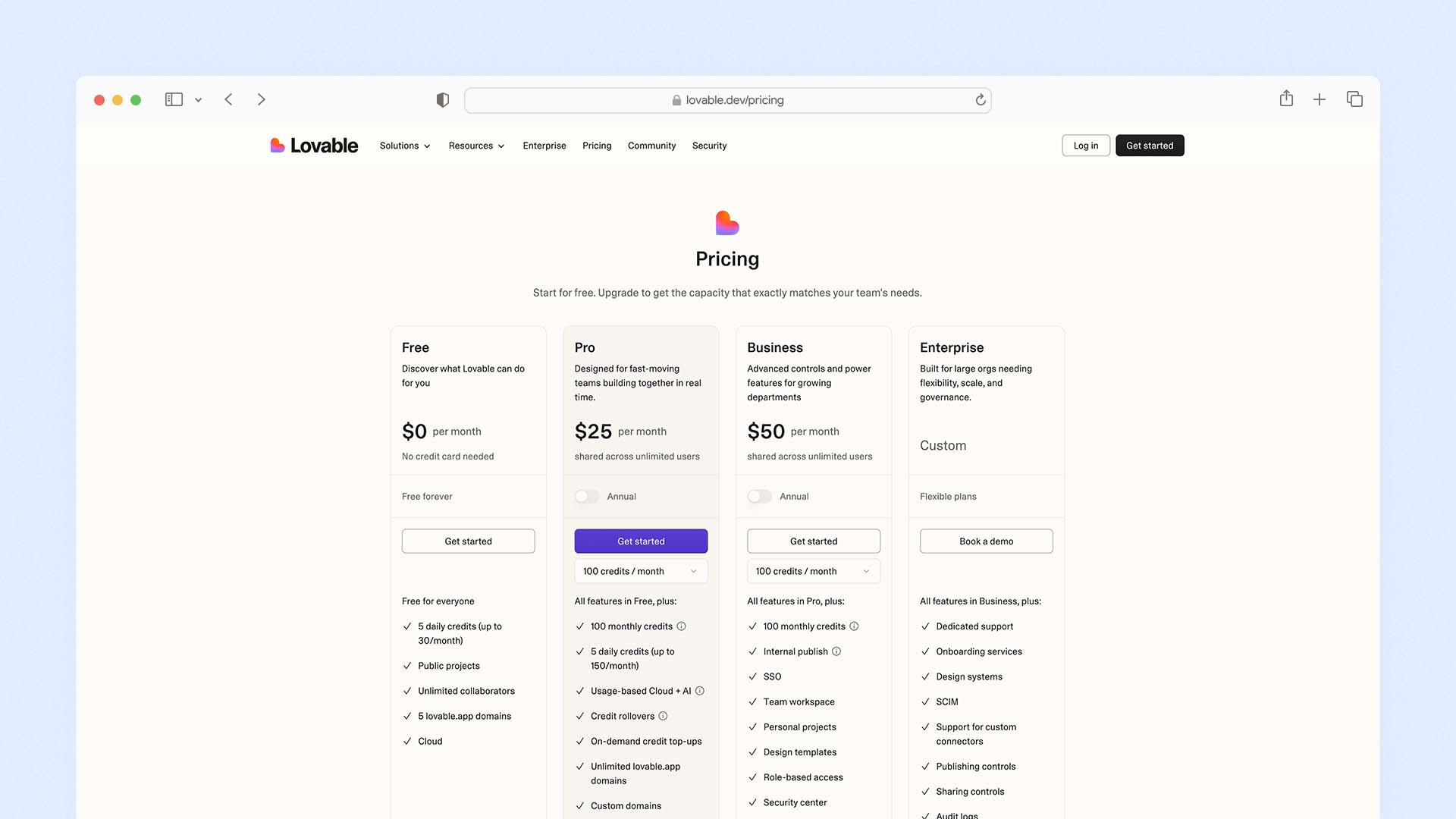
Lovable's pricing is credit-based. Each plan gives you a monthly credit allocation plus 5 daily credits on top. Credits do not roll over between billing periods on the Free plan, but the Pro plan includes credit rollover.
Plan | Monthly Price | Credits | Key Features |
|---|---|---|---|
Free | $0 | 5/day (30/month max) | Public projects only, 5 Lovable subdomains, GitHub sync, one-click deploy |
Pro | $25/month | 100/month + 5/day = 150 total | Private projects, custom domain, remove Lovable badge, credit rollover, add-on top-ups, unlimited team members |
Business | $50/month | 100/month + 5/day = 150 total | SSO authentication, team workspace, personal projects, role-based access, design templates, data training opt-out |
Enterprise | Custom pricing | Custom | Dedicated support, SCIM user management, audit logs, group-based access, publishing controls, custom integrations |
What Does the Free Plan Actually Get You?
The free tier gives you 5 messages per day — a maximum of 30 per month. This is enough to evaluate whether Lovable fits your workflow and to build a basic prototype skeleton. It is not enough to complete a real project in any reasonable timeframe. Most users who try to build something meaningful on the free tier hit the daily limit mid-session and have to wait until the next day to continue — which breaks creative momentum and extends simple projects across weeks.
The free plan is best used for: testing whether Lovable understands your project idea, exploring what the interface generates for a given prompt, and deciding whether upgrading makes sense.
What Does the Pro Plan Actually Get You?
The Pro plan at $25/month is the entry point for real building. With 150 credits per month — 100 monthly allocation plus 5 daily — most solo builders can complete one to two medium-complexity projects per billing cycle. Private projects, custom domains, and credit rollover are included.
A critical and often overlooked detail: Lovable's Pro plan is shared across unlimited team members for the flat $25/month fee. This makes it significantly cheaper than competitors for teams. Bolt.new, by comparison, charges per user — which can make it two to six times more expensive for a team of four or five people at equivalent feature levels.
The Real Monthly Cost for Active Builders
Heavy users who are actively building or iterating daily will typically exhaust their monthly credit allocation before the billing cycle ends. Add-on credit packs are available for purchase to extend your allocation. The total monthly cost for an active builder who regularly buys add-ons can be $40–70 per month rather than the headline $25 — which is still significantly cheaper than hiring a developer for even a single day, but worth budgeting for honestly.
Lovable vs The Alternatives
Lovable vs Bolt.new
Bolt.new uses a token-based pricing model (variable cost per message based on project complexity and file size) rather than Lovable's credit model (flat one credit per message regardless of complexity). For large, complex projects with big codebases, Bolt's token consumption per message increases because it syncs the entire codebase to the AI with each interaction — which can make it expensive for mature projects.
For teams, Lovable is significantly cheaper — $25/month shared across unlimited users vs Bolt's per-user pricing model. For solo developers building complex applications with large codebases, Bolt's 10M tokens per month on the Pro plan may stretch further than Lovable's 150 credits. Both produce similar code quality. Both support full code ownership and export.
Feature | Lovable | Bolt.new |
|---|---|---|
Pricing model | Credit-based (flat per message) | Token-based (variable per message) |
Pro plan price | $25/month | $25/month |
Team pricing | Unlimited users on Pro plan | Per-user pricing |
Code framework | React + TypeScript | React, Vue, Svelte, Astro, Next.js |
Built-in hosting | ✅ Yes | ✅ Yes |
Code export | ✅ Full GitHub sync | ✅ Full export |
Database | Supabase integration | Supabase integration |
Plan Mode | ✅ Yes | ❌ No |
Best for | Non-technical founders, teams | Developers who want framework choice |
Lovable vs Base44
Base44 (acquired by Wix for $80M in 2025) takes a different architectural approach. Rather than connecting to Supabase and Stripe as external services, Base44 handles the database, backend logic, and hosting entirely within its own integrated platform. This makes it easier to set up — no external API keys required — but means you have less code ownership. Frontend code can be exported on the Builder plan, but the backend logic stays on Base44's servers.
Base44 starts at $16/month (Starter plan) vs Lovable's $25/month (Pro plan), making it the cheaper entry point for solo builders. Its choice of AI model — you can select GPT-5, Claude Sonnet, or Gemini 2.5 Pro — is unique on the market and gives experienced users meaningful control over output quality and style.
Feature | Lovable | Base44 |
|---|---|---|
Starting price | $25/month (Pro) | $16/month (Starter) |
Code ownership | ✅ Full (frontend + backend) | Partial (frontend only on Builder plan) |
External services needed | Supabase, Stripe (setup required) | ❌ None — all integrated |
AI model choice | Fixed (Claude-based) | GPT-5, Claude Sonnet, Gemini 2.5 Pro |
Mobile app publishing | ❌ Not yet | ✅ App Store + Google Play |
Best for | Full code ownership, startup MVPs | Non-technical founders, fastest setup |
Lovable vs Wix
These two tools are solving completely different problems — but they come up in the same conversation often enough to address directly.
Wix is a hosted website builder. It generates and manages your site on Wix's platform with no code access. It is designed for business websites — marketing pages, ecommerce stores, service sites, portfolios. It includes hosting, email marketing, CRM, bookings, and 900+ templates. It requires no technical knowledge and no external service accounts.
Wix also ranks as the best overall platform in our comparison of the Best AI Website Builders.
Lovable builds web applications. It generates real code you own and can deploy anywhere. It is designed for products that need user accounts, databases, and custom logic. It requires more technical literacy and external service setup (Supabase, Stripe).
If you're unfamiliar with hosting infrastructure, this guide explains what cloud hosting is and why it affects website speed and reliability.
If you need a business website, Wix is the right choice. If you need to build a software product, Lovable is the right choice. They do not compete in any meaningful sense.
Who Should Use Lovable?
Lovable is the right tool if you fit one of these profiles:
Non-technical founders validating a startup idea. You have a product concept, you need something real enough to show investors or test with users, and you cannot afford a $15,000–50,000 development engagement. Lovable lets you build a working MVP in days rather than months.
Product managers and designers building prototypes. You want something that goes beyond a static Figma mockup — a prototype with real data, real navigation, and real interactions that users can actually experience. Lovable produces that in a fraction of the time it would take to brief and work with a developer.
Developers who want to move faster on boilerplate. If you spend significant time setting up authentication, database schemas, and CRUD operations before you can get to the interesting parts of a project, Lovable automates that scaffolding work while producing code in a stack (React/TypeScript/Supabase) that you can extend in your own editor.
Small teams building internal tools. If your team needs a custom dashboard, an internal CRM, a project tracking tool, or an operations system that does not fit any off-the-shelf software, Lovable can build it in days rather than commissioning a development agency that would take months and cost tens of thousands.
Who Should Not Use Lovable?
You only need a simple business website. If you want a homepage, a services page, a contact form, and a blog, you do not need Lovable. Wix, Squarespace, or Hostinger will get you there faster, cheaper, and with much less complexity. Lovable is significantly over-engineered for a standard informational website.
For standard business websites, platforms like Wix are usually easier. Our guide to the Best Website Builder and Hosting for Small Business explains which builders work best for most companies.
You have no tolerance for iteration. Lovable rarely produces a perfect result from a single prompt. You will need to review the output, identify what is not right, and guide the AI through corrections. Users who expect a one-shot perfect result are consistently disappointed. Users who treat it as a collaborative build process get excellent results.
You are building something highly regulated or security-critical. Applications that handle financial data, medical records, or legal information at scale require security practices and audit processes that go beyond what any AI builder can reliably guarantee. A human developer and a proper security review are non-negotiable for those contexts.
You are a complete beginner with zero technical literacy. Lovable's learning curve is real. Users who do not understand what a database is, what authentication means, or what an API does will struggle to write prompts that produce useful results and will not know how to respond when errors occur. Durable or Wix are better starting points.
Tips for Getting the Best Results From Lovable
Write the Most Specific Prompt You Can
The quality of what Lovable builds is directly proportional to the specificity of your description. Before you start, write down: the name of the app, who uses it, what they can do when logged in, what data gets stored, and what the key screens are. Turn that into your opening prompt. More detail upfront means fewer credit-consuming correction cycles later.
Always Use Plan Mode First
Before the AI starts generating code, read the plan it produces. Check that it has understood your requirements correctly. If anything is wrong or missing, correct it in the chat before the build starts. This single habit will save more credits than any other practice.
Build in Phases, Not All at Once
Do not try to describe your entire application in one prompt. Start with the core feature — the one thing your app must do well. Get that working. Then add the next feature. Then the next. This incremental approach produces better results and makes debugging much easier, because you know exactly which prompt introduced each piece of functionality.
Use a Code Editor for Bug Fixes
When you hit a persistent bug that Lovable has tried and failed to fix twice, export the code to GitHub and fix it in Cursor, VS Code, or Claude Code. Then push the fix and return to Lovable. This hybrid workflow saves credits and avoids the frustrating debugging loop that is Lovable's most significant weakness.
Keep a Prompt Log
Keep a running document of the prompts that worked well and the ones that produced poor results. Over time, this becomes a personal library of effective Lovable prompting patterns that makes every new project faster and more efficient.
Lovable in Practice — Real Use Cases That Work Well
To give you a concrete sense of what works well in Lovable, here are application types that consistently produce strong results:
SaaS landing pages with waitlist capture: A polished marketing page with a hero section, feature breakdown, pricing table, and email waitlist form — built in under 30 minutes from a single prompt. One of the easiest things to build in Lovable.
Client portals: A secure login area where clients can access documents, view project status, and communicate with a service provider. Lovable handles the authentication, permissions, and file management well.
Booking systems: A calendar-based booking tool where customers can select a time slot, enter their details, receive a confirmation email, and get added to a Supabase database. Typically 90–120 minutes to a working prototype.
Internal dashboards: A data visualization tool connected to an existing Supabase or external API. Lovable produces clean chart components, filterable tables, and export functionality from clear descriptions.
Subscription SaaS platforms: A full product with pricing tiers, Stripe subscription billing, user accounts, and role-based access to different features. One of the more credit-intensive builds but achievable within the Pro plan with careful prompting.
Final Verdict
Lovable is the most capable AI application builder on the market for the specific job it is built for. If you are a founder who needs to validate a product idea, a product manager who needs a working prototype, a developer who wants to skip boilerplate, or a small team that needs a custom internal tool — Lovable genuinely delivers something that did not exist two years ago.
The limitations are real: credit-based pricing that can be unpredictable for complex projects, a debugging loop problem that experienced users learn to work around, and a learning curve that requires some technical literacy to navigate effectively. These are not reasons to avoid it — they are reasons to go in with accurate expectations.
Start on the free plan. Build something small. See whether the AI understands your domain and produces output you can work with. If it does, the Pro plan at $25 per month is justified by the first project it helps you finish.
If you're deciding between AI builders and traditional website platforms, our comparison of the Best DIY Website Builders shows which platforms are easiest for beginners.
The most honest summary: Lovable does not replace developers for complex, long-term products. But it gives everyone else — founders, designers, product managers, and early-stage teams — the ability to build real software on their own, which is a genuinely significant shift in how products get made.
FAQs
What is Lovable AI and how does it work?
Lovable has a free plan that gives you 5 messages per day — up to 30 per month. Free plan users can build public projects, sync to GitHub, and deploy to a Lovable subdomain. The free plan is suitable for testing the platform and building simple prototypes, but most users find the daily credit limit too restrictive for building complete applications. The paid Pro plan starts at $25 per month and is shared across unlimited team members.
Is Lovable free to use?
Lovable has a free plan that gives you 5 messages per day — up to 30 per month. Free plan users can build public projects, sync to GitHub, and deploy to a Lovable subdomain. The free plan is suitable for testing the platform and building simple prototypes, but most users find the daily credit limit too restrictive for building complete applications. The paid Pro plan starts at $25 per month and is shared across unlimited team members.
What can you build with Lovable?
Lovable builds full-stack web applications — SaaS dashboards, internal tools, client portals, booking systems, landing pages with CMS, and e-commerce stores. It connects to Supabase for databases and authentication, Stripe for payments, Resend for email, and Clerk for advanced authentication. It does not build native mobile apps (iOS or Android) and is not designed for highly complex enterprise systems.
How does Lovable compare to Framer or Webflow?
Lovable builds full-stack web applications with real databases and backend logic. Framer and Webflow build visual websites and marketing pages. Framer produces the most design-forward output of any website builder. Webflow gives designers the most layout control. Neither Framer nor Webflow builds a backend — they generate frontend-only sites. Lovable generates both the frontend and the backend, making it the right choice when you need user accounts, data storage, or payment processing.
Does Lovable own the code it generates for me?
No. Every application built in Lovable is synced automatically to a GitHub repository that you own and control. The generated code is yours to keep, deploy, modify, and extend — regardless of whether you continue your Lovable subscription. This is one of Lovable's most important advantages over hosted website builders like Wix and Squarespace, which store your content on their servers and do not allow code export.
Is Lovable worth the $25 per month?
For the use cases it is designed for — building MVPs, product prototypes, internal tools, and startup applications — Lovable at $25 per month is excellent value against the alternative of hiring a developer. A freelance developer charges $500–2,000 for a week of work. Lovable can produce a comparable MVP in a fraction of that time and cost. The value diminishes for users who only need a simple business website — for those cases, Wix or Squarespace at $16–23 per month is the better investment.
Latest Blogs
Get the Latest Tech Insights in Your Inbox.
No spam, unsubscribe anytime.